
Transaction Anatomy
Cấu trúc và vòng đời của giao dịch trong Ethereum
Transaction
A transaction is a cryptographically-signed instruction issued by an external account, broadcasted to the entire network using JSON-RPC.
A transaction contains following fields:
-
nonce (): An integer value equal to the number of transactions sent by the sender. Nonce is used to:
- Prevent replay attack: Let's say Alice sends 1 ETH to Bob in a transaction, Bob might try to rebroadcast the same transaction into the network to get additional funds from Alice's account. Since the transaction is signed with a unique nonce, EVM will simply reject it if Bob sends it again. Thus safeguarding Alice's account from unauthorized duplicate transactions.
- Determine contract account address: In
contract creationmode, nonce along with the sender's address is used to determine the contract account address. - Replace a transaction: When a transaction gets stuck due to low gas price, miners often allow a replacement transaction that has the same nonce. Some wallets may provide the option to cancel a transaction by exploiting this behavior. Essentially, a new transaction with the same nonce, higher gas price, and 0 value is sent, effectively overshadowing the original pending transaction. However, it's crucial to understand that the success of replacing a pending transaction is not guaranteed, as it relies on the behavior of miners and network conditions.
-
gasPrice (): An integer value equal to the number wei to be paid per unit of gas. Wei is the smallest denomination of ether. . Gas price is used to prioritize the execution of a transaction. Higher the gas price, more likely that a miner will include the transaction as part of a block.
-
gasLimit (): An integer value equal to the maximum amount of gas to be used in execution of this transaction. Execution of this transaction will stop if the gasLimit is exhausted.
-
to (): The 20-byte address of the recipient of this transaction. The
tofield also determines the mode or purpose of the transaction:
Value of to | Transaction Mode | Description |
|---|---|---|
| Empty | Contract creation | The transaction creates a new contract account. |
| External Account | Value transfer | The transaction transfers Ether to an external account. |
| Contract Account | Contract execution | The transaction invokes the existing smart contract code. |
-
value (): An integer value equal to the number of Wei to be transferred to this transaction's recipient. In
Contract creationmode, value becomes the initial balance of the newly created contract account. -
data () or init(): An unlimited size byte array specifying the input to the EVM. In contract
creation mode, this value is considered asinit bytecode, otherwise byte array ofinput data. -
Signature (): ECDSA signature of the sender.
Contract creation
Let's deploy the following code onto a new contract account:
[00] PUSH1 06 // Push 06
[02] PUSH1 07 // Push 07
[04] MUL      // Multiply
[05] PUSH1 0  // Push 00 (storage address)
[07] SSTORE   // Store result to storage slot 00
The brackets indicate instruction offset. Corresponding bytecode:
6006600702600055Now, let's prepare the init value of our transaction to deploy this bytecode. Init actually consists of two fragments:
<init bytecode> <runtime bytecode>init is executed by EVM only once at account creation. The return value of init code execution is the runtime bytecode, which is stored as part of the contract account. Runtime bytecode is executed every time a contract account receives a transaction.
Let's prepare our init code such that it returns our runtime code:
// 1. Copy to memory
[00] PUSH1 08 // PUSH1 08 (length of our runtime code)
[02] PUSH1 0c // PUSH1 0c (offset of the runtime code in init)
[04] PUSH1 00 // PUSH1 00 (destination in memory)
[06] CODECOPY // Copy code running in current environment to memory
// 2. Return from memory
[07] PUSH1 08 // PUSH1 08 (length of return data)
[09] PUSH1 00 // PUSH1 00 (memory location to return from)
[0b] RETURN   // Return the runtime code and halt execution
// 3. Runtime code (8 bytes long)
[0c] PUSH1 06
[0e] PUSH1 07
[10] MUL
[11] PUSH1 0
[13] SSTORE
The code does 2 simple things: First, copy the runtime bytecode to memory and then return the runtime bytecode from memory.
init bytecode:
6008600c60003960086000f36006600702600055Next, prepare the transaction payload:
[
  "0x", // nonce (zero nonce, since first transaction)
  "0x77359400", // gasPrice (we're paying 2000000000 wei per unit of gas)
  "0x13880", // gasLimit (80000 is standard gas for deployment)
  "0x", // to address (empty in contract creation mode)
  "0x05", //value (we'll be nice and send 5 wei to our new contract)
  "0x6008600c60003960086000f36006600702600055", // init code
];
Order of the values in the payload is important!
For this example, we'll use Foundry to deploy the transaction locally. Foundry is an ethereum development toolkit that provides following cli tools:
- Anvil : A local Ethereum node, designed for development.
- Cast: A tool for performing Ethereum RPC calls.
Install and launch anvil local node.
$ anvil


                             _   _
                            (_) | |
      __ _   _ __   __   __  _  | |
     / _` | | '_ \  \ \ / / | | | |
    | (_| | | | | |  \ V /  | | | |
     \__,_| |_| |_|   \_/   |_| |_|

    0.2.0 (5c3b075 2024-03-08T00:17:08.007462509Z)
    https://github.com/foundry-rs/foundry

Available Accounts
==================

(0) "0xf39Fd6e51aad88F6F4ce6aB8827279cffFb92266" (10000.000000000000000000 ETH)
.....

Private Keys
==================

(0) 0xac0974bec39a17e36ba4a6b4d238ff944bacb478cbed5efcae784d7bf4f2ff80
.....
Listening on 127.0.0.1:8545
Sign the transaction using one of anvil's dummy account:
$ node sign.js '[ "0x", "0x77359400", "0x13880", "0x", "0x05", "0x6008600c60003960086000f36006600702600055" ]' ac0974bec39a17e36ba4a6b4d238ff944bacb478cbed5efcae784d7bf4f2ff80

f864808477359400830138808005946008600c60003960086000f360066007026000551ca01446316c9bdcbe0cb87fac0b08a00e59552634c96d0d6e2bd522ea0db827c1d0a0170680b6c348610ef150c1b443152214203c7f66288ea6332579c0cdfa86cc3f
See Appendix A below for the source of
sign.jshelper script.
Finally, submit the transaction using cast:
$ cast publish f864808477359400830138808005946008600c60003960086000f360066007026000551ca01446316c9bdcbe0cb87fac0b08a00e59552634c96d0d6e2bd522ea0db827c1d0a0170680b6c348610ef150c1b443152214203c7f66288ea6332579c0cdfa86cc3f

{
  "transactionHash": "0xdfaf2817f19963846490b330ae33eba7b42872e8c8bd111c8d7ea3846c84cd51",
  "transactionIndex": "0x0",
  "blockHash": "0xfde1475a716583d847f858c5db3e54156983b39e3dbefaa5829416e6e60a788a",
  "blockNumber": "0x1",
  "from": "0xf39fd6e51aad88f6f4ce6ab8827279cfffb92266",
  "to": null,
  "cumulativeGasUsed": "0xd67e",
  "gasUsed": "0xd67e",
  // Newly created contract address 👇
  "contractAddress": "0x5fbdb2315678afecb367f032d93f642f64180aa3",
  "logs": [],
  "status": "0x1",
  "logsBloom": "0x0...",
  "effectiveGasPrice": "0x77359400"
}
Querying the local anvil node confirms that code is deployed:
$ cast code 0x5fbdb2315678afecb367f032d93f642f64180aa3
0x6006600702600055
And the initial balance is available:
$ cast balance 0x5fbdb2315678afecb367f032d93f642f64180aa3
5
Simulation of contract creation:
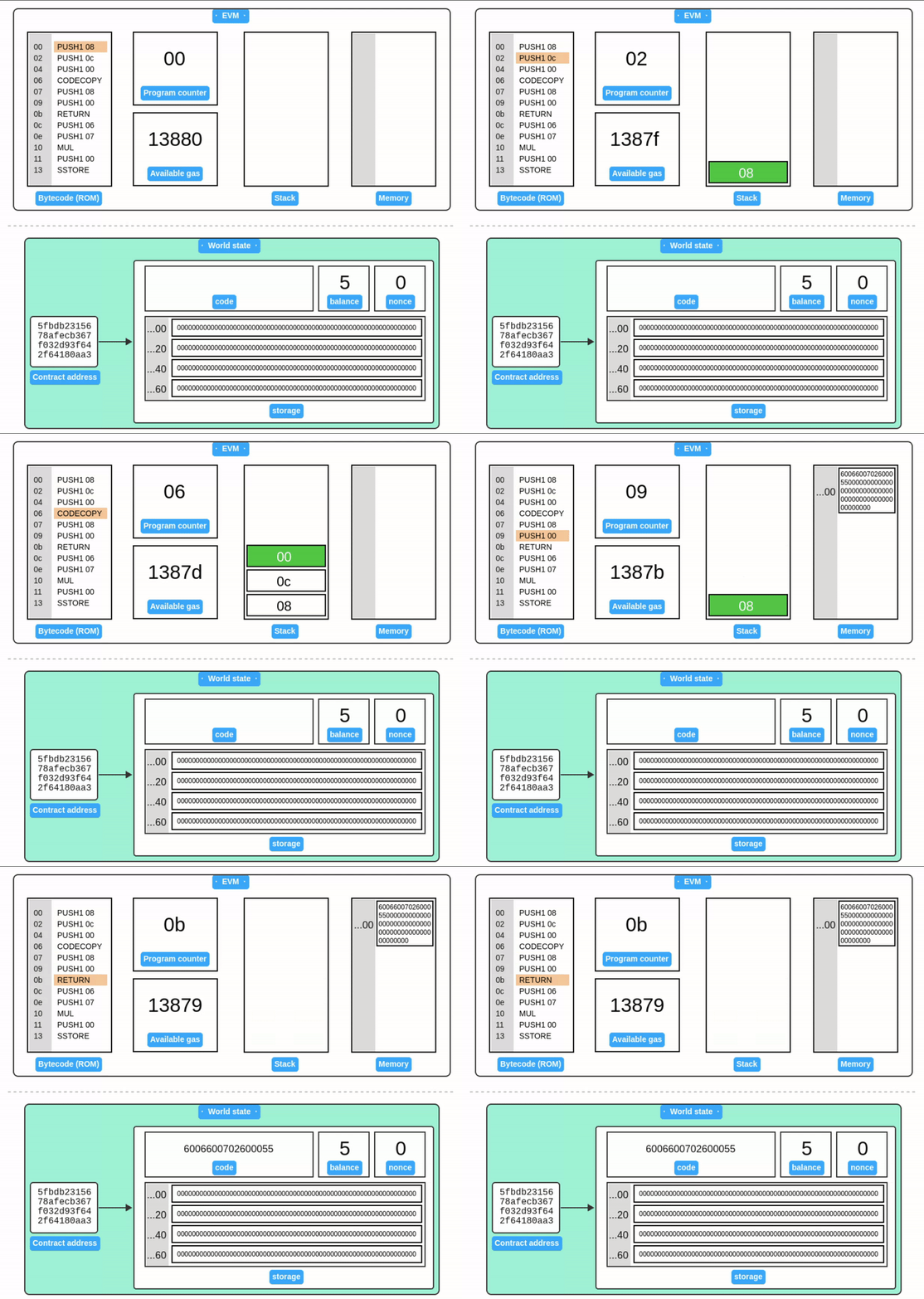
Contract code execution
Our simple contract multiplies 6 and 7, then stores the result to storage slot 0. Let's execute the contract code with another transaction.
The transaction payload is similar, except to address points to the smart contract, value and data is empty:
[
  "0x1", // nonce (increased by 1)
  "0x77359400", // gasPrice (we're paying 2000000000 wei per unit of gas)
  "0x13880", // gasLimit (80000 is standard gas for deployment)
  "0x5fbdb2315678afecb367f032d93f642f64180aa3", // to address ( address of our smart contract)
  "0x", // value (empty; not sending any ether)
  "0x", // data (empty)
];
Sign the transaction:
$ node sign.js '[ "0x1", "0x77359400", "0x13880", "0x5fbdb2315678afecb367f032d93f642f64180aa3", "0x", "0x"]' ac0974bec39a17e36ba4a6b4d238ff944bacb478cbed5efcae784d7bf4f2ff80

f86401847735940083013880945fbdb2315678afecb367f032d93f642f64180aa380801ba047ae110d52f7879f0ad214784168406f6cbb6e72e0cab59fa4df93da6494b578a02c72fcdea5b7838b520664186707d1465596e4ad4eaf8781a721530f8b8dd5f2
Publish the transaction:
$ cast publish f86401847735940083013880945fbdb2315678afecb367f032d93f642f64180aa380801ba047ae110d52f7879f0ad214784168406f6cbb6e72e0cab59fa4df93da6494b578a02c72fcdea5b7838b520664186707d1465596e4ad4eaf8781a721530f8b8dd5f2

{
  "transactionHash": "0xc82a658b947c6083de71a0c587322e8335448e65e7310c04832e477558b2b0ef",
  "transactionIndex": "0x0",
  "blockHash": "0x40dc37d9933773598094ec0147bef5dfe72e9654025bfaa80c4cdbf634421384",
  "blockNumber": "0x2",
  "from": "0xf39fd6e51aad88f6f4ce6ab8827279cfffb92266",
  "to": "0x5fbdb2315678afecb367f032d93f642f64180aa3",
  "cumulativeGasUsed": "0xa86a",
  "gasUsed": "0xa86a",
  "contractAddress": null,
  "logs": [],
  "status": "0x1",
  "logsBloom": "0x0...",
  "effectiveGasPrice": "0x77359400"
}
Read storage slot 0 using cast:
$ cast storage 0x5fbdb2315678afecb367f032d93f642f64180aa3 0x
0x000000000000000000000000000000000000000000000000000000000000002a
Sure enough, the result is indeed 42 (0x2a) 🎉.
Simulation of contract execution:
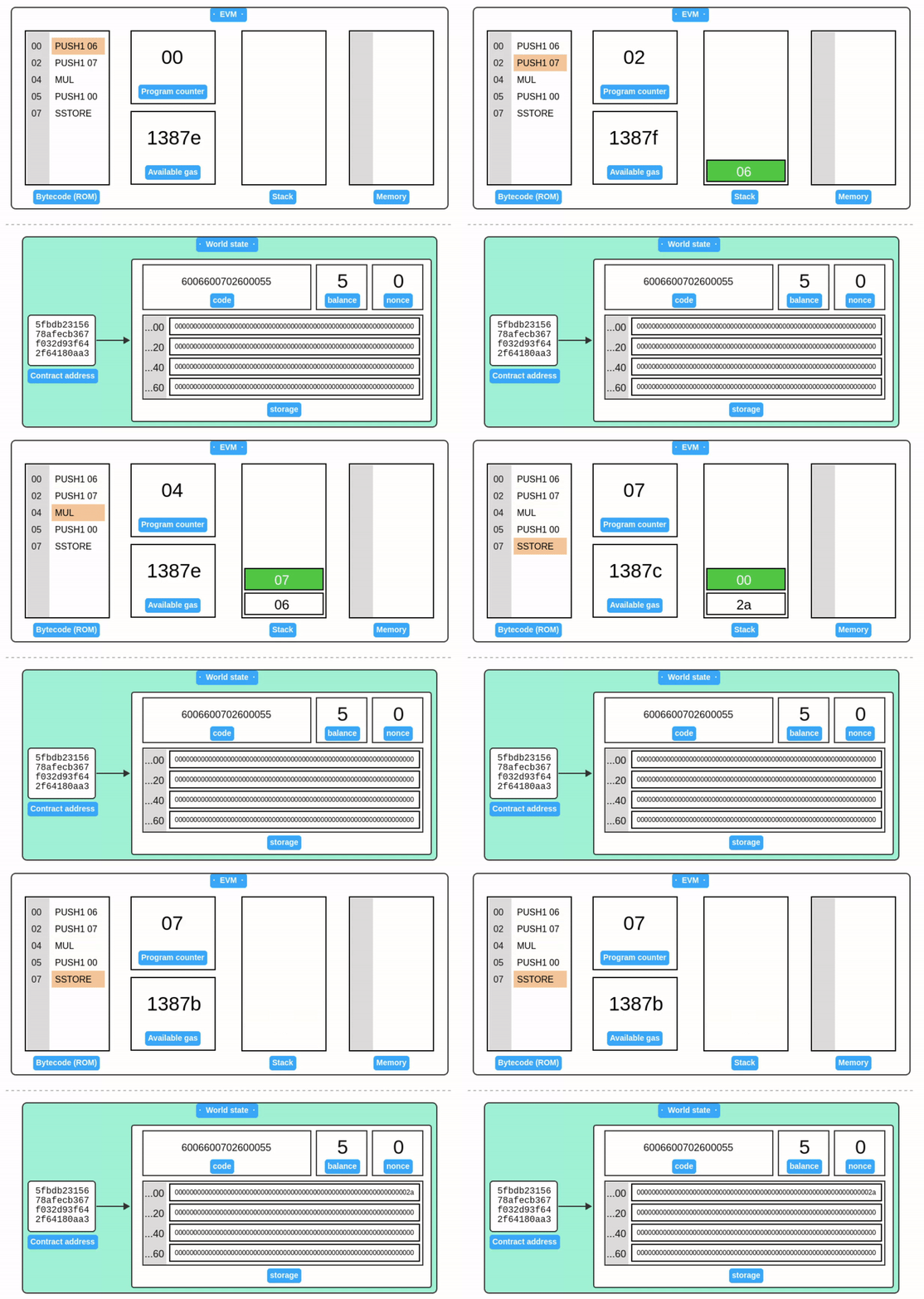
Receipts
Receipts are the output artifacts of the EVM state transition function. Each successfully or unsuccessfully executed transaction results in a corresponding receipt as described in the wiki's data structures section. Here, we will provide provides additional detail on receipt structure and its evolution.
The contents of a receipt are a tuple of five items:
- Transaction Type: This distinguish between legacy and typed transactions and will be discussed more later.
- Status: The transaction status is either
0or1where1indicates a successful transaction and0is for a failed transaction. - Gas Used: Total gas consumed by all previous transactions in the block + the current transaction's gas used.
- Logs: A log entry is a tuple of the logger's address, a possibly empty series of indexed 32-byte log topics, and some number of non-indexed bytes of raw event data.
- Logs Bloom: A 256-byte bloom filter used to quickly search for relevant logs in a block, which allows applications to efficiently check if an address or event signature is included in logs.
Some additional information on how logs bloom is used to allow applications to efficiently check if an address or event signature is included in logs can be found here.
The receipt is committed to the block's Receipt Trie.
Typed Transactions and Receipts
EIP-2718 introduces a unified and extensible format for both transactions and receipts through the concept of typed envelopes. This extension simplifies the introduction of new transaction and receipt types, while maintaining full backward compatibility with legacy transactions.
Prior to EIP-2718, adding new transaction types required cumbersome techniques to differentiate them within the constraints of RLP encoding, leading to brittle designs. EIP-2718 solves this by defining a dedicated Transaction Type prefix.
Transactions after EIP-2718 follow the envelope format: Typed Transaction = Transaction Type + Transaction Payload
Where:
- Transaction Type: a single-byte identifier specifying the transaction type.
- Transaction Payload: an opaque byte array defined by the respective transaction type's specification.
Note that legacy transactions are formatted as RLP([nonce, gasPrice, ..., s])
Receipt Encoding
Receipts now adopt the same envelope pattern: Typed Receipt = Receipt Type + Receipt Payload
Where:
- Transaction Type: a single-byte identifier specifying the transaction type.
- Receipt Payload: is interpreted based on the associated Transaction Type definition.
Note that legacy receipts are formatted as RLP([status, gasUsed, bloom, logs])
Both transactions and receipts can be efficiently identified:
- If the first byte
∈ [0x00, 0x7f], it is a typed transaction or receipt. - If the first byte
≥ 0xc0, it is a legacy transaction or receipt, as dictated by RLP list encoding.
The first byte of a typed receipt must be the same as the
TransactionTypeof its associated transaction.
This rule ensures that clients can deterministically decode receipts without needing additional metadata.
In summary, EIP-2718 made Ethereum transactions and receipts more extensible while preserving backward compatibility with legacy clients.
Appendix A: Transaction signer
signer.js: A simple node.js script for signing transactions. See comments for explanation:
/**
 * Utility script to sign a transaction payload array.
 * Usage: node sign.js '[payload]' [private key]
 */

const { rlp, keccak256, ecsign } = require("ethereumjs-util");

// Parse command-line arguments
const payload = JSON.parse(process.argv[2]);
const privateKey = Buffer.from(process.argv[3].replace("0x", ""), "hex");

//validate privatekey length
if (privateKey.length != 32) {
  console.error("Private key must be 64 characters long!");
  process.exit(1);
}

// STEP 1: Encode payload to RLP
// Learn more: https://ethereum.org/en/developers/docs/data-structures-and-encoding/rlp/
const unsignedRLP = rlp.encode(payload);

// STEP 2: Hash the RLP encoded payload
// Learn more: https://ethereum.org/en/glossary/#keccak-256
const messageHash = keccak256(unsignedRLP);

// STEP 3: Sign the message
// Learn more: https://epf.wiki/#/wiki/Cryptography/ecdsa
const { v, r, s } = ecsign(messageHash, privateKey);

// STEP 4: Append signature to payload
payload.push(
  "0x".concat(v.toString(16)),
  "0x".concat(r.toString("hex")),
  "0x".concat(s.toString("hex"))
);

// STEP 5: Output RLP encoded signed transaction
console.log(rlp.encode(payload).toString("hex"));
Resources
- 📝 Gavin Wood, "Ethereum Yellow Paper."
- 📘 Andreas M. Antonopoulos, Gavin Wood, "Mastering Ethereum."
- 📝 Ethereum.org, "RLP Encoding."
- 📝 Ethereum.org, "Transactions."
- 📝 Random Notes, "Signing transactions the hard way." • archived
- 🎥 Lefteris Karapetsas, "Understanding Transactions in EVM-Compatible Blockchains."
- 🎥 Austin Griffith, "Transactions - ETH.BUILD."
- 🧮 Paradigm, "Foundry: Ethereum development toolkit."
- Receipts in Wire Protocol • archived
- EiP-2718 • archived
- Receipt Contents • archived